
Published by GAD Software
Experts in Workflow Automation, AI Enablement, and Operational Systems Integration for Modern Businesses.
Listen to this article
Prefer to listen? Play the audio version while you review the key ideas.
Loading the ElevenLabs Text to Speech AudioNative Player...
This listening feature reflects the same principle we apply to client operations: reduce friction, improve access, and make information easier to use.
Many businesses know they have manual processes slowing them down. The challenge is knowing which processes should be automated first.
Not every manual task is a good automation candidate. Some tasks are too inconsistent, too judgment-heavy, or not important enough to justify the effort. Other tasks, however, quietly drain hours every week, create avoidable errors, delay customer service, and make it harder for teams to scale.
The goal is not to automate everything. The goal is to identify the workflows where automation, AI, or custom software — or a combination of the three — can create measurable operational improvement.
For many teams, these workflows were never designed to become permanent systems. They started as practical workarounds, then slowly became part of daily operations. At the time, those manual processes served an important purpose: they helped the company keep moving, support customers, grow, and adapt. Some may still be working today. But as volume, complexity, and customer expectations increase, the question becomes whether those same processes are still supporting growth — or quietly becoming bottlenecks.
This article explains how to recognize manual processes that are ready for automation and how to prioritize them in a practical, business-focused way.
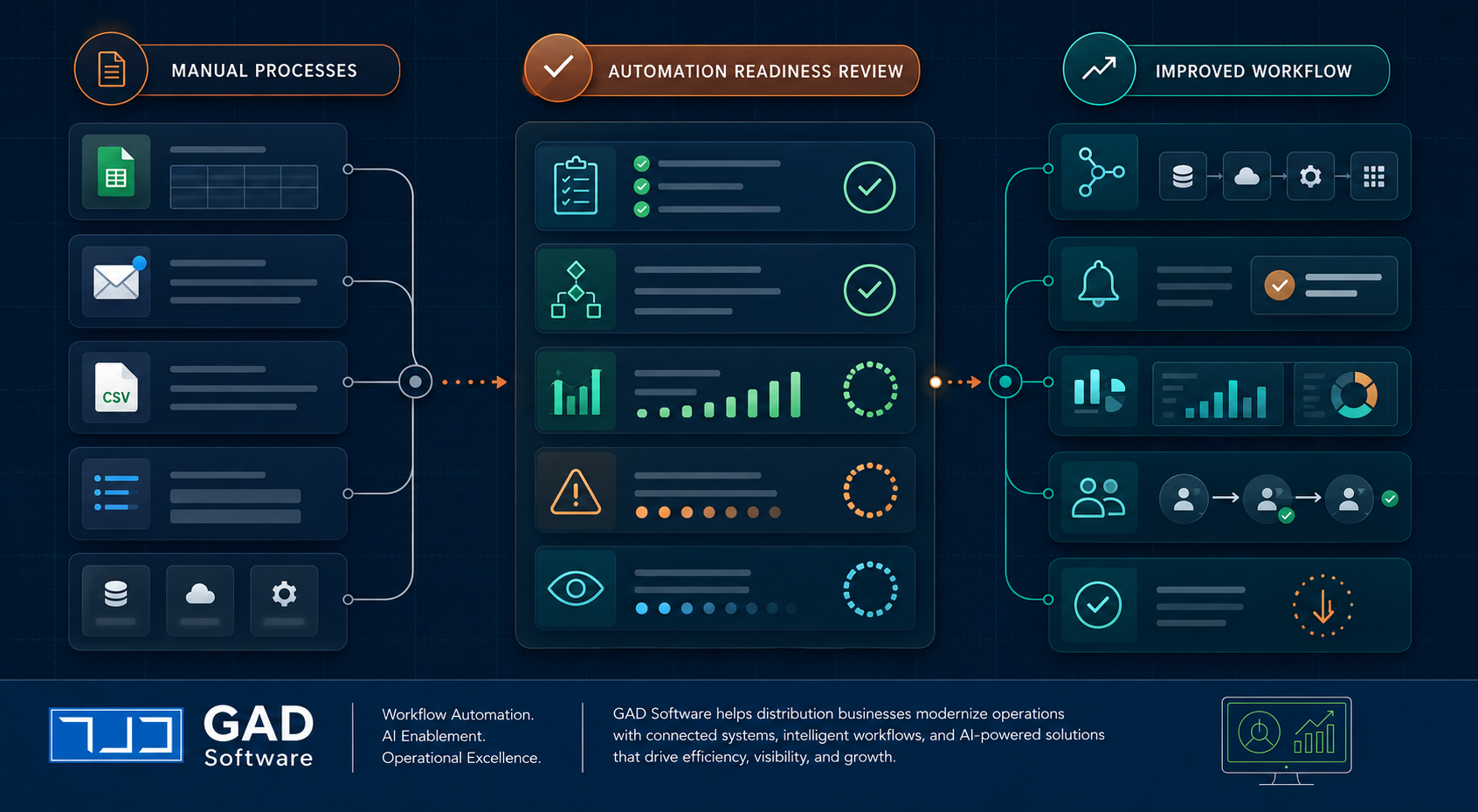
Image description: Figure 1 shows a flow from left to right. On the left, manual processes are represented by spreadsheets, emails, CSV files, documents, and system icons. In the center, an Automation Readiness Review zone displays checklists, charts, warning indicators, and progress tracking. On the right, an Improved Workflow section shows connected systems, alerts, dashboards, user handoffs, and cleaner operational flows.
Why Manual Processes Become a Problem
Manual processes are not always bad. In many businesses, they are how work gets started. A spreadsheet, shared inbox, checklist, or manual export may be the quickest way to solve a problem at the beginning.
But as the business grows, these temporary solutions can become operational bottlenecks.
A process that worked when the company handled 20 transactions per week may start breaking down at 100, 500, or 1,000. What once felt flexible can become fragile.
Common signs include:
- Employees entering the same data into multiple systems
- Teams relying on spreadsheets as the main source of truth
- Work being tracked through email threads or chat messages
- Reports taking hours or days to prepare
- Customers waiting because internal information is hard to find
- Managers depending on staff updates instead of real-time visibility
- Errors increasing as volume increases
What Makes a Process Ready for Automation?
A process is usually ready for automation when it has a clear pattern.
This does not mean the process must be perfect. It means the process follows enough structure that software can assist, connect systems, reduce repeated work, or guide the team through the workflow.
The strongest automation candidates usually share several traits.
1. The Process Is Repetitive
Repetition is one of the clearest signs that a process may be ready for automation.
If employees perform the same task every day or every week using the same steps, forms, systems, or documents, there may be an opportunity to automate part of the workflow.
Examples include:
- Copying customer information from one system to another
- Creating invoices from order records
- Downloading CSV files and uploading them into another system
- Sending the same type of follow-up email repeatedly
- Updating spreadsheets after each transaction
- Preparing recurring reports
- Checking whether required fields are complete
Repetitive work often looks harmless because each individual task may only take a few minutes. But across dozens or hundreds of transactions, those minutes become significant.
2. The Process Has Clear Rules or Decision Points
Automation works best when the process has rules.
Rules do not need to be complicated. They can be simple business logic such as:
- If an invoice amount is over a certain limit, request approval
- If a required document is missing, notify the operations team
- If a delivery is completed, update the order status
- If a customer submits a form, create a task for follow-up
- If a CSV file is received, validate the data before import
- If a record is incomplete, flag it before it reaches accounting
When decisions are based on consistent rules, automation can help standardize the workflow and reduce the chance that steps are missed.
AI can also assist when the process includes unstructured information, such as emails, PDFs, notes, or images. For example, AI may help extract information from documents, classify requests, summarize messages, or route work to the right team.
3. The Process Requires Data Entry Across Multiple Systems
Manual data entry between systems is one of the most common automation opportunities.
Many businesses use several tools that do not fully connect with each other. For example, a company may use one system for orders, another for dispatch, another for accounting, and spreadsheets to fill the gaps.
When systems do not communicate, people become the integration layer.
That usually means employees are:
- Exporting data from one system
- Cleaning or reformatting files
- Uploading CSV files into another system
- Re-entering information manually
- Checking whether records match
- Fixing errors after imports fail
This kind of work is a strong candidate for automation because it is usually structured, repetitive, and measurable.
4. The Process Creates Errors or Rework
Errors are not just a quality issue. They are often a workflow design issue.
When a process depends heavily on manual entry, memory, or repeated copying, mistakes become more likely. Even strong employees make errors when they are forced to perform repetitive tasks under time pressure.
Common examples include:
- Incorrect invoice amounts
- Missing customer details
- Duplicate records
- Wrong delivery dates
- Incomplete forms
- Mismatched order and billing information
- Reports built from outdated spreadsheet versions
The real cost is not only the error itself. It is the rework that follows: investigation, correction, communication, delay, and sometimes customer frustration.
Automation can reduce errors by enforcing required fields, validating information, standardizing steps, and moving data directly from one system to another.
5. The Process Delays Revenue, Service, or Decision-Making
Some manual workflows are more costly because they slow down important business outcomes.
For example, if invoice preparation is delayed because information must be collected from several systems, the business may experience slower billing cycles and delayed cash flow.
If dispatch updates are manually collected and entered later, the operations team may lack real-time visibility.
If reports take too long to prepare, managers may make decisions using outdated information.
Automation becomes more valuable when it improves speed in areas tied to revenue, customer service, compliance, or operational visibility.
Faster invoice creation
Reduce delays between service delivery and billing.
Quicker customer follow-up
Respond to inquiries and requests without manual delays.
More timely dispatch updates
Keep operations informed with real-time status changes.
Real-time status tracking
Eliminate the need for manual status meetings and updates.
Faster exception handling
Identify and route problems before they escalate.
More accurate management reports
Support better decisions with timely, reliable data.
6. The Process Depends Too Much on One Person
Many businesses have key employees who know exactly how a process works. They understand the spreadsheet, the exceptions, the file format, the email routine, and the workaround needed when something fails.
That knowledge is valuable, but it can also create risk.
If a process only works because one person knows how to manage it manually, the business may face problems when that person is unavailable, overloaded, or leaves the company.
Automation and custom software can help turn individual knowledge into a more repeatable system.
7. The Process Is Difficult to Track
A strong automation opportunity often appears where visibility is weak.
If the team cannot easily answer questions like "What is pending?", "Who has the next step?", "Which orders are delayed?", or "Which invoices are waiting for review?", the workflow may need better structure.
Manual tracking often hides work inside:
- Email inboxes
- Chat messages
- Individual spreadsheets
- Paper notes
- Shared folders
- Verbal updates
- Manual status meetings
Automation can improve visibility by creating structured records, status updates, dashboards, notifications, and exception reports.
This does not always require a large system. Sometimes the best first step is a lightweight workflow tool, integration, or custom dashboard that gives the team a reliable view of what is happening.
8. The Process Has Enough Volume to Justify Improvement
A process may be technically automatable, but that does not mean it should be automated immediately.
Volume matters.
A task that happens once a month may not be worth automating unless it is highly critical, complex, or risky. A task that happens 50 times per day is usually a better candidate.
When evaluating automation opportunities, consider:
- How often the process happens
- How long each task takes
- How many people are involved
- How often errors occur
- How much rework is required
- Whether the process affects revenue or customers
- Whether the workload is increasing
The best automation opportunities usually combine high frequency with high business impact.
When Not to Automate Yet
Automation is powerful, but it should not be applied blindly.
Some processes are not ready for automation because they are unclear, unstable, or rarely used. Automating a broken process can make the problem faster instead of better.
In these cases, the better first step is to clarify, document, simplify, or standardize the process before automation.
A Simple Automation Readiness Checklist
Use this checklist to evaluate whether a manual process may be ready for automation.
A process is a strong candidate if you answer "yes" to several of these questions:
- Does the task happen repeatedly?
- Does it follow clear steps or rules?
- Does it involve copying or moving data between systems?
- Does it require manual data entry?
- Does it create frequent errors or rework?
- Does it delay billing, service, dispatch, reporting, or decisions?
- Does it depend heavily on one person?
- Is it difficult to track status manually?
- Does it involve spreadsheets, CSV files, emails, or shared folders?
- Would the business benefit from faster, more accurate, or more visible execution?
The more "yes" answers you have, the more likely the process deserves a closer review.
Want a Faster Way to Evaluate Your Workflows?
Use the GAD Software AI Workflow Readiness Scorecard to identify which manual processes may be ready for automation, AI support, or custom software.
Common Manual Processes That Are Often Ready for Automation
Some of the most common automation candidates include:
- Invoice preparation and invoice entry
- Order entry and order status updates
- Customer follow-up emails
- Dispatch updates and delivery confirmations
- CSV imports, exports, and data validation
- Spreadsheet-based reporting
- Approval workflows
- Document intake and review
- Reconciliation between systems
- Internal task handoffs
These workflows are often good candidates because they tend to involve repeated steps, structured information, multiple systems, and clear business outcomes.
Example: Invoice Entry Workflow
Consider a business where invoice information is created in one system, dispatch details are managed in another system, and accounting is handled in QuickBooks.
If the team must export CSV files, manually review records, correct formatting, upload files into another system, and verify that invoices match delivery information, the workflow may be ready for automation.
This type of workflow is often a strong automation candidate because it is repetitive, structured, system-driven, and directly connected to revenue operations.
Automation, AI, or Custom Software?
Once a process is identified as a candidate, the next step is deciding what type of solution fits best.
Some workflows only need basic automation, such as moving data, sending alerts, or updating records.
Other workflows may benefit from AI, especially when they involve unstructured information such as emails, documents, notes, or images.
Some workflows require custom software when the business needs a more tailored interface, custom rules, dashboards, integrations, or role-based workflows.
The right solution depends on the process, the systems involved, the quality of the data, and the business goal.
A practical automation review should identify what is slowing the business down, what can be standardized, what can be connected, and what should remain human-controlled.
Final Thoughts
Manual processes are often easy to ignore because they are familiar. Teams get used to workarounds, spreadsheets, repeated data entry, and manual follow-ups.
But as a business grows, those manual steps can limit speed, accuracy, visibility, and scalability.
The best automation opportunities are usually found in workflows that are repetitive, rule-based, system-driven, error-prone, and important to daily operations.
By identifying these processes carefully, businesses can avoid unnecessary technology projects and focus on improvements that create real operational value.
Next Step
If your business relies on manual data entry, spreadsheets, CSV exports, repeated emails, or disconnected systems, GAD Software can help you identify where automation, AI, or custom software may create the most value.
Start by reviewing your workflows with the GAD Software AI Workflow Readiness Scorecard or request an Automation Scan to identify practical opportunities for improvement.
GAD Software helps operational businesses reduce repetitive work, improve visibility, and eliminate workflow bottlenecks through automation, AI enablement, and custom software solutions.
About GAD Software
GAD Software is a consulting and technology firm specializing in workflow automation, AI enablement, operational systems integration, and business process optimization.
GAD Software helps organizations modernize operations through connected systems, intelligent workflows, and scalable automation solutions.
Last Updated: May, 2026
Ready to identify which manual workflows are slowing your business down?
GAD Software helps operational businesses evaluate manual processes, disconnected systems, spreadsheets, CSV workflows, and repetitive back-office tasks to identify practical opportunities for automation, AI enablement, and custom software.
Related Articles
Continue exploring operational efficiency topics:
Case Study: Connecting a Custom Fuel Order System to Fuel Dispatch Software
How GAD Software integrated an in-house web application with a third-party fuel dispatch and delivery platform using API-based order creation.
What Is Workflow Automation? A Practical Guide for Fuel & Petroleum Distributors
Learn how workflow automation helps fuel and petroleum distributors reduce manual work, improve operational efficiency, and modernize business processes.